Collaborating with Git
Contents
A lot of the time if you are working on a bigger project you will want to fork the repository, make the required changes, and then request that these be merged with a pull request.
A pull request is an unintuitive term (in my opinion). If you make a pull request, you are asking the maintainer of a repository to pull changes you have made to that repository. So from your perspective, it is more like a push than a pull.
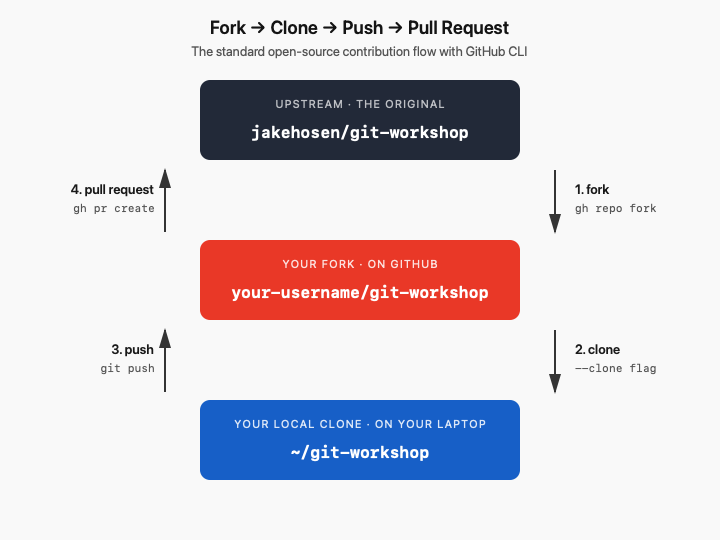
Fork a repository, change it, and make a pull request
1. Fork the repository
From any directory, run:
gh repo fork jakehosen/git-workshop --clone
Two things happen at once:
ghcreates a fork on your GitHub account (it’ll be atyour-username/git-workshop).- It clones that fork to your current directory.
You’ll also be asked whether to add the original repo as an upstream remote — say yes. That gives you a way to pull in updates from the original later.
Move into the folder:
cd git-workshop
2. Create a branch for your changes
Don’t work directly on main. Make a branch:
git switch -c my-edits
Name it something descriptive — fix-typo-in-readme, add-example-script, etc.
3. Make changes, commit, push
Edit the files, then stage and commit:
git add .
git commit -m "Short description of what you changed"
Push the branch to your fork:
git push -u origin my-edits
The -u sets up tracking so future git pushes on this branch don’t need extra arguments.
4. Open the pull request
Still in the project directory, run:
gh pr create
You’ll be prompted for:
- Title — short summary of the change.
- Body — what you did and why. Be specific; the maintainer will read this.
- Base repository — confirm this is
jakehosen/git-workshop(the original). - Base branch — usually
mainon the upstream.
When you confirm, gh opens the PR on GitHub and prints the URL.
Alternate shorter method for creating a PR
If you already know what you want to say:
gh pr create --title "Fix typo in README" --body "Caught a typo in the introduction section."
To open the PR page in your browser right after:
gh pr view --web
Pair Exercise: Forks, Pull Requests, and Merge Conflicts
In this exercise, you and a partner will simulate a real-world situation where two people edit the same file in the same project at the same time. One of you owns the repo; the other forks it and contributes back. Both of you edit the same line and you have to fix it.
By the end you’ll have walked through the entire fork-and-PR workflow and resolved a real merge conflict.
Roles
Pair up. Decide who plays which role:
This paragraph will be purple.
- Maintainer: creates the repo, owns
main, will merge the PR at the end.
- Contributor: forks the repo, makes a change, opens the pull request.
You can switch roles and repeat if there’s time.
Part 1 — Maintainer: create the repo
-
From any directory, create a new local repo:
mkdir conflict-demo cd conflict-demo git init -
Create a simple README:
echo "# Conflict Demo" > README.md echo "" >> README.md echo "Favorite color: TBD" >> README.md -
Commit it:
git add README.md git commit -m "Initial commit" -
Create the repo on GitHub repository on the website like we did in the getting started exercise. Then push the changes using the instructions on the new repository page. They will look like the commands below, but adjusted for username and repository name, so use the version of the commands on the website.
git remote add origin git@github.com:your-username/conflict-demo.git git branch -M main git push -u origin main -
Tell your partner the repo path —
your-username/conflict-demo. You can also open it in the browser to confirm it’s live:gh repo view --web
Part 2 — Contributor: fork, clone, and prepare a change
Get the repository address as described above
-
Fork and clone in one step:
gh repo fork maintainer-username/conflict-demo --clone
cd conflict-demo
When asked about adding an upstream remote, say yes.
-
Make a branch for your change:
git switch -c pick-a-branch-name -
Open
README.mdand change the line:Favorite color: TBDto your actual favorite color, for example:
Favorite color: cerulean -
Commit and push your branch:
git add README.md
git commit -m "Set favorite color to cerulean"
git push -u origin my-favorite-color
Part 3 — Maintainer: make a conflicting change
While your contributor was working, you also had opinions about color. You’re going to change the same line to something different.
-
Make sure you’re on
main:git switch main -
Edit
README.mdand change the same line to your favorite color (different from your partner’s):Favorite color: mauve -
Commit and push directly to
main:git add README.md git commit -m "Set favorite color to chartreuse" git push
Now main on GitHub has your version of that line. The Contributor’s fork still has their version on the branch.
Checkpoint. Tell your partner to open the PR now.
Part 4 — Contributor: open the pull request
From inside the project folder, open the PR:
gh pr create --title "Set favorite color" --body "Adding my favorite color."
Confirm the base is the upstream main. Then open the PR in the browser:
gh pr view --web
You should see a yellow or red banner that says something like:
This branch has conflicts that must be resolved
Both branches changed the same line so Git can’t automatically merge. You have to decide how to resolve this.
Part 5 — Resolve the conflict
There are a couple of ways to resolve a PR conflict.
As the contributor
-
Pull the latest
mainfrom upstream into your PR branch:git fetch upstream git merge upstream/main(If
ghdidn’t add the upstream remote earlier, add it now withgit remote add upstream git@github.com:maintainer-username/conflict-demo.gitand re-run the fetch.) -
Git will tell you about the conflict:
CONFLICT (content): Merge conflict in README.md Automatic merge failed; fix conflicts and then commit the result. -
Open
README.md. You’ll see the conflict markers:<<<<<<< HEAD Favorite color: cerulean ======= Favorite color: chartreuse >>>>>>> upstream/main- The top section is your version (the Contributor’s branch).
- The bottom section is the Maintainer’s version (from upstream
main).
- Talk to your partner. Decide together how to resolve:
- Keep one color and discard the other?
- Combine them:
Favorite color: cerulean and chartreuse? - List both on separate lines?
Edit the file to reflect the decision, and remove all the
<<<<<<<,=======, and>>>>>>>markers. -
Stage and commit the resolution:
git add README.md
git commit
Git will pre-fill a merge commit message. Save and close it.
-
Push the fix to your PR branch:
git push - Refresh the PR page in your browser. The conflict banner should be gone, and the PR should now say it can be merged.
Part 6 — Maintainer: merge the PR
- Review the change on the PR page.
-
Click Merge pull request, then Confirm merge.
Or from the command line:
gh pr merge --merge
The Contributor’s resolved change is now on main.