Things to do before the workshop
Using Terminals
A local terminal with git installed is required to fully access the features available from Git and GitHub. For macOS and Linux, the built-in terminal will work. For Windows, you can use Windows Powershell. There is also a terminal program called gitbash that is installed when you install Git that has similar functionality. There are also many other good terminal options out there to fit the many preferences that different programmers have.
Pick a terminal to use and make sure that git and related software are installed and working on your chosen terminal. If you need a crash course in terminal basics, check out the Mozilla Command Line Crash Course.
Note about shortcuts
For Linux and Windows users, terminal clients have a conflict with common shortcuts. The most significant of these is the fact that ctrl+c in the terminal kills (cancels) whatever program/process is running. This is an issue because ctrl+c is also the most commonly used copy shortcut. There are two solutions to this:
- All the traditional shortcuts have shift added. So to copy you change
ctrl+ctoctrl+shift+c. - Use a different set of shortcuts. For example, copy is
shift+insert. This is the default setting for a lot of windows terminal software. If you prefer theshiftmethod, you can go into options for programs like Git Bash and selectctrl+shift+letter shortcutsas indicated in the graphic below.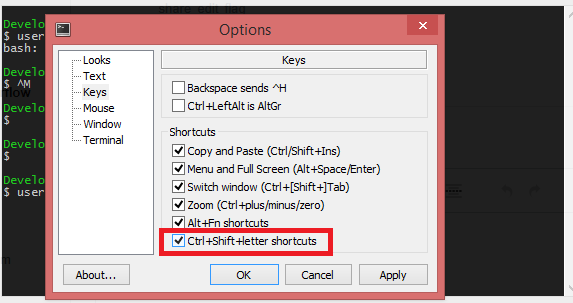
Note for Windows Powershell users.
I recommend installing Vim and Nano, two common text editors in Windows Powershell. You can do this with the following commands:
winget install vim.vim
winget install GNU.Nano
Vim text editor
If you are not familiar with vim, the most commonly used terminal text editor, I recommend checking out this brief primer.
Software to install
- Git
- GitHub CLI: This is a set of commands that automate common git functions, but only work for GitHub, not other git repositories.
- If you are using Windows and do not have administrator access, use the following command to install for one user without an admin password:
winget install --id GitHub.cli --scope user.
- If you are using Windows and do not have administrator access, use the following command to install for one user without an admin password:
- Visual Studio Code (not to be confused with Visual Studio).
- RStudio
- Optional: Install GitHub Desktop GUI. Features are limited compared to the command line and so we will not directly use this in our workshop, but can provide useful visualization of commits.
Configuring your terminal for Git
The easiest way to access GitHub repositories from the terminal is via SSH. This requires setting up a new SSH key and uploaded the public version of this key to Github
- Setup a new SSH key using the operating system-specific instructions found here.
- Add the SSH Key to your GitHub Account.
- You can confirm you have your SSH key setup for Github with the following command:
ssh -T git@github.com
Watch this video
Check out these two videos. The first is a very brief description of Git and its basic functionality. The second is a talk from a recent open source software conference describing a particular philosphy for programming with Git. I think you’ll be able to understand the major points of the second video before the workshop, but you may want to revisit this video after you’ve gotten some hands-on experience with Git.